How to Choose the Best FEA Simulation Software for Your Business

Choosing the best FEA simulation software for engineering analysis can enable your business to reduce development costs and bring products to market faster. Ensuring that the software chosen has not only current needs in mind but also future-proofs you for any finite element analysis needs down the line.
TriMech supports many different simulation tools to help provide solutions for all your simulation requirements, whether you need basic static analysis, optimization studies, or powerful cloud-solvers. Being able to choose between complimentary, first pass analysis tools or a fully featured, advanced simulation suite, how do you know what option is best for you?
Simulation Capabilities
The most important thing to think about when choosing the best FEA simulation software for your team is making sure it can run the type of studies you require. If all you need is to simulate static loading with basic materials on small assemblies, then you probably don’t need to invest in a system that supports cloud-solvers and material calibration.
SOLIDWORKS Simulation is an excellent choice for teams invested in the SOLIDWORKS Simulation looking for both linear and nonlinear capabilities including optimization, buckling, and random vibration studies. It also supports robust, built-in material database, a web portal for verified materials, and the ability to create custom libraries to use empirically tested data in your studies.

However, if you need to consistently run studies on high-density foams or need computationally heavy car crash simulations, then SOLIDWORKS Simulation may not fit the bill. The SIMULIA simulation suite enables engineers to virtually test products for structural integrity, multibody dynamics, and durability using local resources or by offloading calculations to the cloud.
While there is some overlap between SOLIDWORKS Simulation and SIMULIA, there are additional meshing techniques and access to the ABAQUS solvers when using the 3DEXPERIENCE enabled product.
Engineering Interconnectivity
Choosing the best FEA simulation software means you must look past the core analysis functionality into how it interacts with the rest of your ecosystem. The best simulation software seamlessly connects to your CAD data and lifecycle management, ensuring product revisions can instantly turn into analytical insights.
SOLIDWORKS Simulation and SIMULIA effortlessly connect with your design data and the larger SOLIDWORKS ecosystem to maintain digital links to the rest of engineering.

SOLIDWORKS Simulation integrates directly into SOLIDWORKS Design meaning that analysts and engineers are working in the same environment that the models were designed. This enables real-time updates, as model changes can be instantly reflected in the simulation studies.
SIMULIA tools run outside of SOLIDWORKS meaning that users aren’t also consuming a SOLIDWORKS license to run their studies. However, model changes can be pushed into studies since the data model is shared on the 3DEXPERIENCE platform.
SOLIDWORKS Simulation natively supports both 3DEXPERIENCE and SOLIDWORKS PDM for data management while SIMULIA relies just on 3DEXPERIENCE. Both solutions also support 3rd-party CAD formats using either the unified 3DEXPERIENCE data model or 3DInterconnect to analyze non-SOLIDWORKS models.
Ease of Use
For an end user, it is important to keep the ease of use of the software in mind when choosing the best FEA simulation software for your business. Making sure the analysis workflows align with what your team is used to is key to improving adoption.
This can be a combination of having a clear, straightforward interface and being similar to other software packages the team may have used in the past.
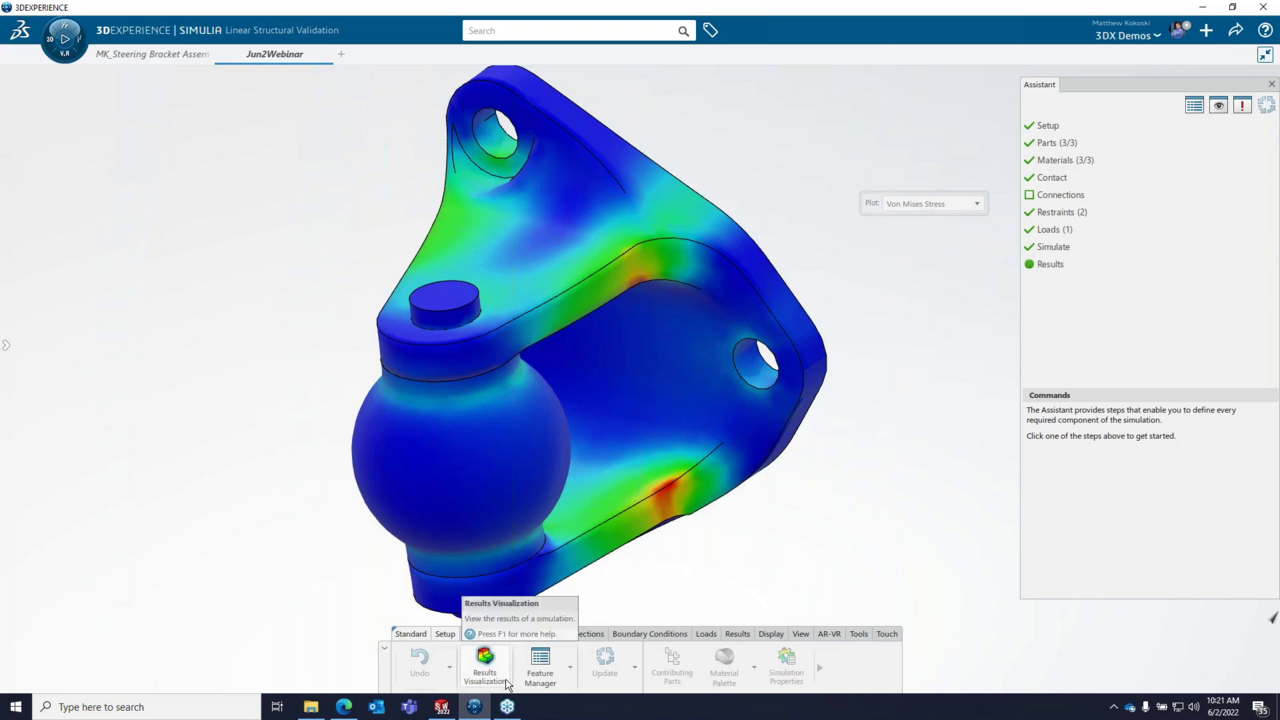
No matter the option chosen, users will find themselves at home with any of the software options due to the friendly, familiar interfaces. SOLIDWORKS Simulation adopts the same workflows users are comfortable with in SOLIDWORKS, using CommandManager tabs and familiar tree structures. SIMULIA adopts a more CATIA-like approach but has a built in assistant to help the greenest users run impactful studies.
Training and Support
Last but certainly not least is how accessible training and support for your new FEA software are. Training provides the fundamentals and foundation for future programming success. TriMech provides certified, instructor-led training for all of our simulation solutions.
Additionally, we offer a SOLIDWORKS Training Passport that includes our most popular training courses to give you the essential skills you need to use SOLIDWORKS effectively and will help you obtain SOLIDWORKS certification. Regardless, you’ll find helpful training topics, how-to guides, and video tech tips alongside other articles posted by our technical experts.
TriMech is committed to making sure you make the right decisions based on your design and engineering requirements. Our team will work with you to find the best FEA simulation software that not only lets you get started quickly but also promotes long-term growth and success. There’s no better time to start your simulation journey than today.
Ready to invest in the best FEA simulation software solution for you and your team? Contact us here.

Related Software
SIMULIA
SIMULIA software accelerates the process of evaluating the performance, reliability and safety of materials and products before committing to physical prototypes.