




What is DraftSight desktop software?
DraftSight is a feature-rich 2D and 3D CAD solution for architects, engineers and construction service providers, as well as professional CAD users, designers, educators and hobbyists.
More options, choices and tools to suit your design needs and preferences.
Real design freedom is letting you work the way you want to work. It’s the ability to effortlessly go from 2D drafting to 3D modeling and back again in order to optimize and maximize designs. And the capability to seamlessly integrate with other Dassault Systèmes and SOLIDWORKS® solutions, including SOLIDWORKS PDM to easily manage your DWG file designs from first inspiration to final outcome.
DraftSight gives you the freedom to do what you do best — no matter who you are or what you’re trying to accomplish.
Overview Demo
Get to know DraftSight
DraftSight Capabilities
Built with AutoCAD users in mind, DraftSight includes the following:
"DraftSight is the best alternative to AutoCAD 2D on the market today. In addition to being a free product, as with all of Dassault Systemes products, DraftSight is a pleasure to work on and with."
Larry Sketo
Owner, Design Pallets, Inc.
"DWG files are the most popular file format for 2D CAD data in the world. It was only natural that we choose a solution that processes this format natively and renders DWG data incompatibility issues a thing of the past."
Thanh Canh Pham
Project Manager, Bobst Group
DraftSight Features
DraftSight adds new productivity tools including the new Data Extraction Wizard
Page Layout Manager
The latest DraftSight release includes one of our users' most requested features. The new Page Layout Manager will save you time setting up your print or plot settings.
Instead of creating and managing an external print configuration file, you can save all your print or plot parameters in a named setup that is saved inside your drawing or template file.
Annotation Monitor
DraftSight’s associative dimensioning tool is a fantastic way to make sure your dimensions update whenever your geometry changes.
But sometimes these associative dimensions become disassociated from their entities.
DraftSight addresses this issue with the introduction of the new Annotation Monitor feature. When it’s enabled, any dimension that has lost its association will display a small, yellow, warning icon next to the offending dimension.
Contextual Ribbon Tab
Access to the commands you need for your current workflow has been made easier in DraftSight with Contextual Ribbons.
Now, instead of a dialog box cluttering your editor, the Ribbon will display a new, active tab that is appropriate for your current task.
HomeByMe Improvements
DraftSight has provided an add-in for years that acts as a bridge between a HomeByMe project and a functional 2D CAD drawing.
That interface has been updated to provide a more intuitive user experience. And the underlying program architecture has been completely revamped to give our customers even greater functionality
Data Extraction Wizard
DraftSight 2023 lets you dig deep into your drawing files to gather critical information. And we made it as easy as stepping through a Wizard to find and use that valuable data.
The new EXTRACTDATA command can be found in the Tables panel of the Annotate tab in the Ribbon Menu. And of course, if you prefer, you can type it into the Command Window.
DraftSight Packages
For CAD users, Professionals, Educators and Students
Package
DraftSight Premium
For individuals, designers, makers, manufacturers, professionals, and companies that need a robust 2D drafting and 3D design experience to help meet their needs on drafting, modeling, prototyping, manufacturing, laser cutting and 3D printing.
It includes all DraftSight Professional features plus a comprehensive set of 3D DWG design and constraint capabilities.
Download a 30-day trial or purchase from the DS Online Store. Note there is no support from TriMech for this product.
Package
DraftSight Professional
For professionals and companies that need an advanced 2D CAD drafting solution with powerful, productivity boosting features and API to help bring their designs to life quickly and easily.
Includes industry standard content that can be added to a document with ease, batch printing to print multiple files without opening them, and a familiar user interface that makes it easy to transition from other comparable CAD applications.
Buy now from the DS Online Store. Note there is no support from TriMech for this product.
Package
DraftSight Enterprise
For large organizations with many users or multiple sites that need an advanced 2D CAD drafting solution with powerful, productivity boosting features and API to help bring their designs to life quickly and easily.
Enterprise includes full technical support from TriMech and network licensing to enable concurrent usage across your organization.
Package
DraftSight Enterprise Plus
For large organizations with many users or multiple sites that need a robust 2D drafting and 3D design experience to help meet their needs on drafting, modeling, prototyping, manufacturing, laser cutting and 3D printing.
Includes all DraftSight Enterprise features plus a comprehensive set of 3D DWG design and constraint capabilities, full technical support and network licensing to enable concurrent usage across the organization.
DraftSight Matrix
Compare the four versions of DraftSight software
| Features | Professional (2D) | Premium (3D) | Enterprise (2D) | Enterprise Plus (3D) |
|---|---|---|---|---|
| 2D Design Tools Create basic elements such as lines, polylines, arcs, circles, ellipses, layers, blocks, and others. | ● | ● | ● | ● |
| 2D Documentation Tools Create basic annotation elements such as notes, dimensions, tables, hatches, clouds, and others. | ● | ● | ● | ● |
| Community Resources Offer learning resources and a collaborative environment to interact with your peers, ask questions, and share opinions. | ● | ● | ● | ● |
| Toolbox Quickly generate hardware, holes, balloons, Bills of Materials (BOMs), welding and surface finish symbols. | ● | ● | ● | ● |
| Batch Printing Send a set of drawings and sheets to printers in a batch job. | ● | ● | ● | ● |
| Drawing Compare Compare graphically similar entities between two drawing documents. | ● | ● | ● | ● |
| Power Trim Trim multiple, adjacent entities by dragging the pointer across each entity. | ● | ● | ● | ● |
| G-Code Generator Communicate with a CNC machine for fabrication. | ● | ● | ● | ● |
| DGN Import Directly import and convert the DGN file format drawing into a DraftSight project for direct editing. | ● | ● | ● | ● |
| DraftSight APIs Allow end users or third-party developers to customize and automate DraftSight. | ● | ● | ● | ● |
| Image Tracer Convert an imported raster image file (ex. floor plan, logo) into vectorized line entities. | ● | ● | ● | ● |
| Using Formulas in Table Cells Use formulas in cells with arithmetic operators and the Sum, Average, and Count functions. | ● | ● | ● | ● |
| Trimming of Hatches and Gradients Trim hatches and gradients with the Trim and PowerTrim commands. | ● | ● | ● | ● |
Premium Tools | ||||
| 3D Modeling Tools Introduces 3D modeling using basic geometrical shapes (ex. Box, Pyramid) or other methods (ex. Extrude, Revolve) with Boolean operations (ex. Union, Subtract). | ● | ● | ||
| 2D Constraints Use 2D Constraints to control drawing entities parametrically by specifying geometric and dimensional properties of entities. | ● | ● | ||
Interoperability Tools | ||||
| 3DEXPERIENCE® Marketplace Integration | ● | ● | ● | ● |
| HomeByMe Integration | ● | ● | ● | ● |
| 3DEXPERIENCE, GEOVIA, DELMIA, SOLIDWORKS Electrical, PDM Connectors | ● | ● | ● | ● |
| PDF Import/Convert & Underlay | ● | ● | ● | ● |
| DGN Import/Convert & Underlay | ● | ● | ● | ● |
Customization Tools | ||||
| Application Programming Interface (API) | ● | ● | ● | ● |
| Macro Recording | ● | ● | ● | ● |
Enterprise Tools | ||||
| Network License Enable concurrent usage and compliance across the organization. | ● | ● | ||
| Deployment Wizard Enable large groups of users to install or upgrade DraftSight. | ● | ● | ||
| Technical Support Answer questions or troubleshoot issues related to DraftSight. | ● | ● | ||
A Complete Solution
Why Choose TriMech?
Partnering with TriMech also gives you access to additional offers and resources


DraftSight FAQs
Get answers to frequently asked questions about DraftSight
DraftSight Resources
Guides, tutorials, and best practices

How to Choose the Best CAD Software for Your Business
Learn how to choose the best CAD software for your manufacturing needs. Compare features, compatibility, and support to make the right decision.

Best Practices for Securely Sharing CAD Data
Data management is one of the most important parts of any company. It isn’t just about where we save an…
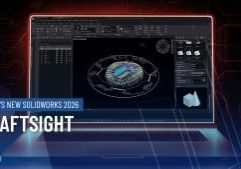
DraftSight | What’s New in SOLIDWORKS 2026
DraftSight 2026 is built for professionals who rely on precision and speed in their 2D design workflows. If you work in architecture, civil engineering, or manufacturing, these enhancements offer meaningful improvements that simplify design and improve collaboration.

DraftSight | What’s New in SOLIDWORKS 2026
SOLIDWORKS 2026 introduces a suite of enhancements that elevate 2D workflows to new levels of precision, flexibility, and efficiency. Whether you’re scaling up your drawing environment or automating repetitive tasks, DraftSight 2026 empowers you to work smarter thanks to streamlined workflows.

Ready, Set, Switch – Discover DraftSight
Get ready for an insider’s look at the DraftSight User Interface and its powerful features, led by your expert host,…

Looking for a Cloud Alternative?
3DEXPERIENCE Works provides a Safe, Social, Connected, Informed and Structured alternative to DraftSight for team leaders, project managers and other professionals who want to manage data on the cloud and collaborate without constraints.
Safe: Customer controlled access. Transparent cloud backup. Encrypted communication protocols. Data always safe-no overwrite, no loss of data.
Social: Integrated structured and unstructured collaboration tools enabling social innovation. Collaborate on product design or engage with your stakeholders early in product development.
Connected: Every user always connected to a single, common database. Access data anywhere, anytime, on any device. Review and markup models.
Informed: Choose from the widget library, Create and share Dashboards. Get the latest information about your product development. Always have access to your latest data.
Structured: Zero overhead data management - store and manage data across collaborative spaces, share information in communities. Find indexed data faster by using tags, custom search, etc.