SOLIDWORKS Routing | What’s New in SOLIDWORKS 2026
SOLIDWORKS 2026 introduces a suite of enhancements that elevate SOLIDWORKS Routing to new levels of precision, flexibility, and efficiency. Whether you’re working with multi-layered hydraulic hoses to complex electrical assemblies, SOLIDWORKS 2026 empowers you to work smarter thanks to streamlined workflows. These enhancements enable engineers to design with confidence, reduce errors, and streamline production.
Come explore the standout features in SOLIDWORKS Routing that make SOLIDWORKS a must-have for companies looking for a competitive edge.
Multi-Layer Coverings for Routes
In industries where hydraulic systems face extreme pressures and environmental exposure, insulation and protection are non-negotiable. SOLIDWORKS 2026 introduces the ability to model multiple layers of coverings directly within your routing assemblies.
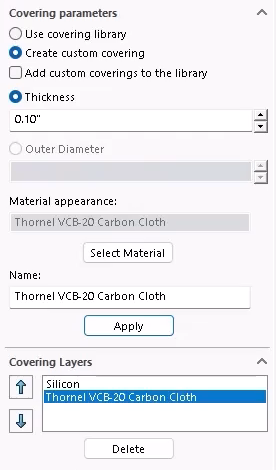
Creating multi-layer cable coverings
Designers can now account for insulation jackets, weatherproofing, and other protective layers with precision. This feature ensures that designs reflect real-world conditions, helping teams avoid costly oversights during installation and operation.
Reusable Covering Favorites
Efficiency in design often comes down to repeatability. The new SOLIDWORKS release allows users to save groups of covering layers as favorites, making it easy to apply consistent protection across multiple routes.

Selecting a covering favorite
When working on a fleet of machines or a series of similar assemblies, this feature eliminates the need to manually recreate layer stacks. Designers can focus on innovation, knowing their protective standards are maintained across projects.
Using Sketches in Electrical Auto Routes
Routing electrical components in large assemblies has always been a critical challenge to overcome complex routes and deal with assembly motion. The new sketch-guided Auto Route feature in SOLIDWORKS transforms this process.

Using a guide sketch for auto routing
SOLIDWORKS users can now define a 3D sketch path that guides wire, cable, or harness routing, ensuring tight organization and avoiding clashes. This method is faster and more consistent with traditional modeling practices, making it applicable across a variety of complex systems.
Switching Sheet Formats for Flattened Routes
Documentation is a critical part of engineering workflows, and this year’s release makes it more flexible than ever. When detailing flattened electrical routes, users can now switch sheet formats without disrupting the layout.

Changing the manufacturing drawing template
Views, tables, and annotations scale proportionally, preserving the professional appearance of the drawing. This feature saves time and ensures consistency, regardless of the documentation requirements or sheet size.
Upgrading to SOLIDWORKS 2026
SOLIDWORKS 2026 delivers meaningful improvements that simplify routed assembly design while enhancing control and integration. From smarter, guided auto routing capabilities to intuitive cable cover management, these updates reflect the evolving needs of professional engineers.
Whether you need assistance during the upgrade process or just want to explore these great new enhancements, TriMech is your trusted technical partner. Our team is here to help ensure that upgrading SOLIDWORKS is one of the best decisions you make.
To learn more about SOLIDWORKS 2026 and get a trial, click here.