SOLIDWORKS PDM | What’s New in SOLIDWORKS 2026
SOLIDWORKS 2026 introduces a suite of enhancements that elevate data management to new levels of precision, flexibility, and efficiency. These enhancements empower engineering teams to collaborate more effectively, manage data with greater precision, and safeguard critical design information. Whether you’re working with a few designers, a large production team, or a multi-site team, SOLIDWORKS 2026 empowers you to work smarter thanks to streamlined workflows.
Come explore the standout features in SOLIDWORKS PDM that make SOLIDWORKS 2026 a must-have for companies looking for a competitive edge.
Improved Search Interface
SOLIDWORKS PDM 2026 introduces a redesigned search interface featuring a split-button layout.
This intuitive design allows users to quickly relaunch their last executed search or access card searches, favorites, and search tools with fewer clicks. The result is a more efficient data retrieval process, reducing time spent navigating menus and improving productivity.
Better Search Favorite Control
SOLIDWORKS users now have greater control over search favorites with the ability to prevent automatic execution upon load.
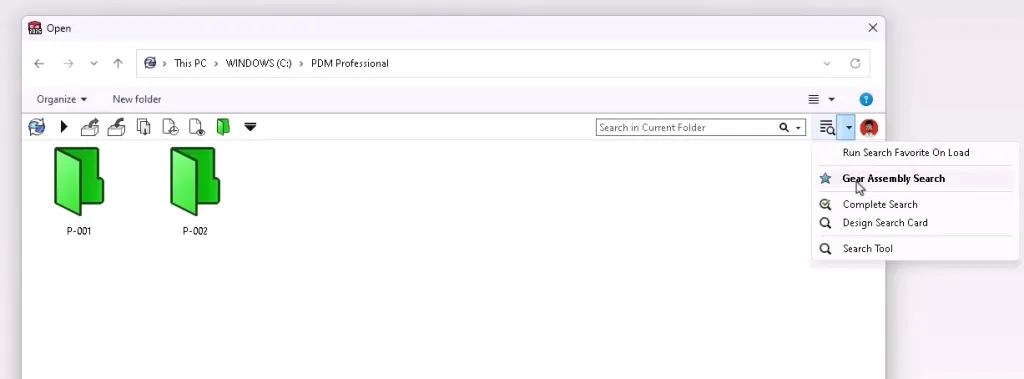
SOLIDWORKS PDM search favorites
This means engineers can load saved search criteria, adjust parameters as needed, and execute searches only when ready, ideal for refining queries without triggering unnecessary results.
Wildcard Search Enhancements
Search Card controls have been upgraded to support both exact value matching and implicit wildcard searches. SOLIDWORKS PDM users can now locate files using partial terms across combo boxes, dropdowns, and list boxes, making it easier to find relevant data without knowing the exact file name.
Transfer Ownership
Arguably, the most impactful update is the ability to transfer ownership of files that haven’t been checked back into the vault.

Transferring ownership of a checked-out file
This addresses a critical risk scenario where unsaved changes could be lost due to user departure or system failure. With background vault synchronization, managers can recover and reassign data seamlessly.
Improved Revision Tracking
SOLIDWORKS PDM revision variables are now visible in both the Contains and Where Used views, giving PDM users and administrators deeper insight into component relationships. This enhancement supports better decision-making during approval workflows and simplifies data recovery in the event of a disaster.

Revisions in the Where Used tab
Extended File Preview Support
Preview capabilities have been extended to include Parasolid files up to version 37.1 and STEP formats AP203, AP214, and AP242. SOLIDWORKS PDM users can now review these files directly within drawings, eliminating the need to open them in SOLIDWORKS and accelerating design validation.
Enhanced Folder Permissions
Manufacturing workflows benefit from refined folder access controls in SOLIDWORKS PDM 2026. Users can now navigate to subfolders within restricted hierarchies using specific permissions, such as “May see folders,” “Read file contents,” and “Show working versions,” without exposing parent folder data.
PDM Web2 Interface Additions
The SOLIDWORKS PDM Web2 interface has received a visual overhaul, including a progress indicator during login and a collapsible information panel. Additionally, users can switch between bills of materials from a dropdown list to streamline collaboration.

Changing the BOM displayed in PDM Web2
These refinements improve usability and allow users to tailor their workspace to suit individual workflow needs.
eDrawings and HTML Publishing
eDrawings conversion now preserves file properties at both the individual and component levels, ensuring metadata integrity. Additionally, HTML publishing for drawings is now supported directly within SolidWorks, offering a new output format for web-based sharing.
Workflow Archiving and File Path Conditions
PDM administrators can now archive workflows intended for future retirement while retaining the ability to restore them. Previously, the workflows would clutter up the Administration tool.

Archived and active workflows
File path type conditions are also available by default when creating workflow conditions, simplifying setup and reducing configuration time.
Upgrading to SOLIDWORKS 2026
SOLIDWORKS PDM 2026 delivers meaningful improvements that simplify part design while enhancing control and integration. From enhanced search functionality to transferring ownership of files and expanded preview support, these updates reflect the evolving needs of professional engineers.
Whether you need assistance during the upgrade process or just want to explore these great new enhancements, TriMech is your trusted technical partner. Our team is here to help ensure that upgrading to SOLIDWORKS 2026 is one of the best decisions you make.
To learn more about SOLIDWORKS 2026 and get a trial, click here.