Part Modeling | What’s New in SOLIDWORKS 2026
SOLIDWORKS 2026 introduces a suite of enhancements that elevate part modeling to new levels of precision, flexibility, and efficiency. Whether you’re working with simple parts, multi-body sheet metal designs, or complex structure systems, SOLIDWORKS 2026 empowers you to work smarter thanks to streamlined workflows.
Come explore the standout features in part modeling that make SOLIDWORKS 2026 a must-have for companies looking for a competitive edge.
Offset Sheet Metal Base Flange
SOLIDWORKS Sheet Metal gets a major upgrade with the ability to offset base flanges from the sketch plane. Previously, the base flange was locked to the original sketch plane, which limited design flexibility.
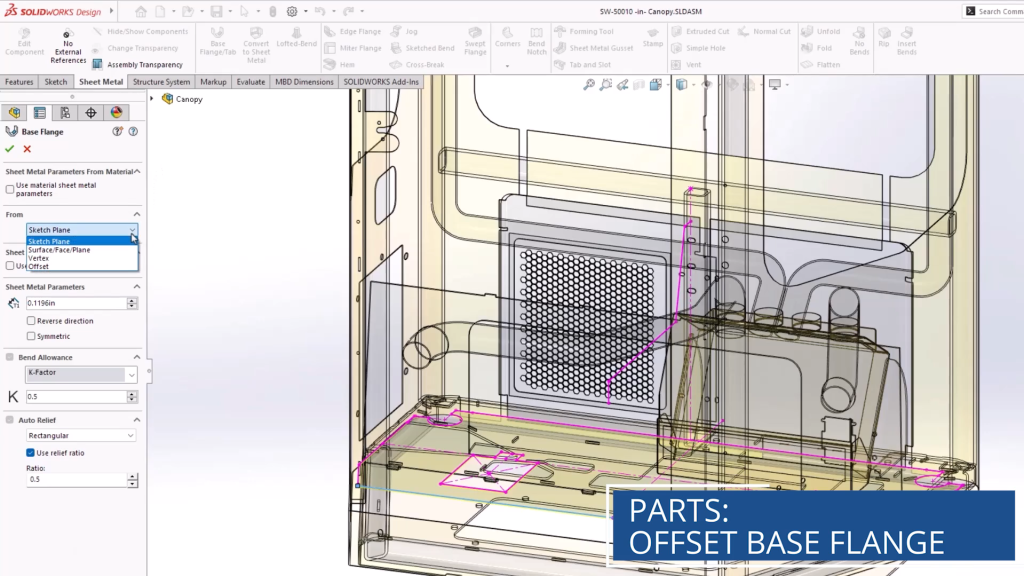
The new offset sheet metal base flange options
In SOLIDWORKS 2026, users can offset their base flanges by a specific value, vertex, surface, face, or plane, giving greater control over part geometry and alignment. This enhancement is especially useful for assemblies requiring precision and brings the experience more in line with traditional extruded features.
Internal Corner Treatment
The Break Corner command has been an incredible time saver to simplify the corner treatment of sheet metal designs. Historically, the Break Corner command has only worked for external corners of the model.

Internal corner treatment checkbox
SOLIDWORKS 2026 introduces a new checkbox to include internal corners in this command. This enhancement makes internal corner treatment just as easy as external.
Delete Unused Equations
Equations are one of the most powerful tools in SOLIDWORKS, allowing you to link together dimensions and create a true parametric design quickly. However, if a feature or sketch that contained an equation was deleted, the equation was left dangling and could cause issues down the line.

Deleting unused equations
The new Delete Equations checkbox, available when removing features and sketches, solves this issue. Now, any equations that would be left dangling or that were absorbed by the feature are automatically removed.
Improved Structure System Corner Treatment
Structure systems were introduced in SOLIDWORKS 2019 and provide an enhanced workflow for quickly creating welded structures without having to sketch out the entire wireframe.
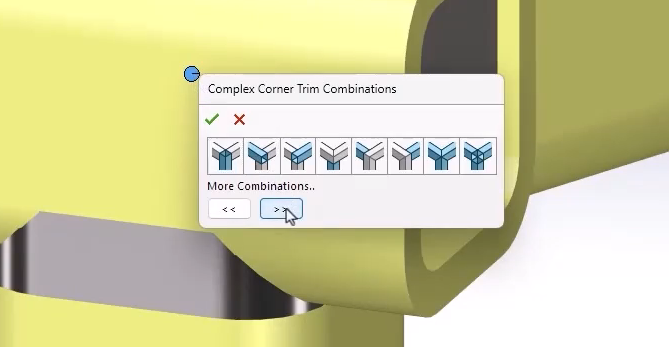
SOLIDWORKS Structure Systems corner treatment
The new corner treatments in SOLIDWORKS 2026 add a more intuitive workflow, allowing you to better preview and select treatment in a brand new in-context menu. Additionally, color-coded indicators help identify the corner type to make it easier to understand what’s going on.
Accessible Cut List Properties
Cut lists are an essential tool for combining, tracking, and organizing a bill of materials for a multi-body part. They can include properties related to the cost, length, and part numbers for each body within the multi-body part.

Cut list properties in the SOLIDWORKS custom properties
SOLIDWORKS 2026 introduces better availability of those properties in downstream applications like SOLIDWORKS PDM or the 3DEXPERIENCE platform. Cut list properties are now directly referencable in part configurations, removing the need for complicated workarounds.
Reference Points by Coordinates
Reference points let you easily provide locations in 3D space with accuracy and precision without needing external geometry. They give a consistent, independent reference that can be used for locating positions for features, advanced mating and assemblies, or setting up measurements and analysis.

Creating points by numeric values
You can now define reference points from X, Y, and Z values. This improvement can be used to quickly create geometry and references that would otherwise prove challenging.
Define Bounding Box Directions
Bounding boxes in SOLIDWORKS help to define the smallest envelope that encloses the model. This can be helpful when working with space constraints or working with sheet metal stocks before manufacturing your part.

Defining directions for bounding box
Previously, the length, width, and height directions might have changed based on model changes. Now, users can define these based on specific planes to ensure consistency in their designs.
Upgrading to SOLIDWORKS 2026
SOLIDWORKS 2026 delivers meaningful improvements that simplify part design while enhancing control and integration. From smarter sheet metal workflows to intuitive structure systems and equation management, these updates reflect the evolving needs of professional engineers.
Whether you need assistance during the upgrade process or just want to explore these great new enhancements, TriMech is your trusted technical partner. Our team is here to help ensure that upgrading to SOLIDWORKS 2026 is one of the best decisions you make.
To learn more about SOLIDWORKS 2026 and get a trial, click here.