3DEXPERIENCE Collaboration | What’s New in SOLIDWORKS 2026
SOLIDWORKS 2026 introduces a suite of enhancements that elevate 3DEXPERIENCE to new levels of precision, flexibility, and efficiency. Whether you’re looking to streamline communication, improve data visibility, or work more efficiently, SOLIDWORKS 2026 empowers you to work smarter thanks to improved workflows.
Come explore the standout features in 3DEXPERIENCE that make SOLIDWORKS 2026 a must-have for companies looking for a competitive edge.
Introducing Aura – Your AI Companion
Aura is a new AI-powered assistant embedded within SOLIDWORKS 2026. It enables engineers to quickly summarise community posts, wikis, and documentation, offering key insights at a glance.
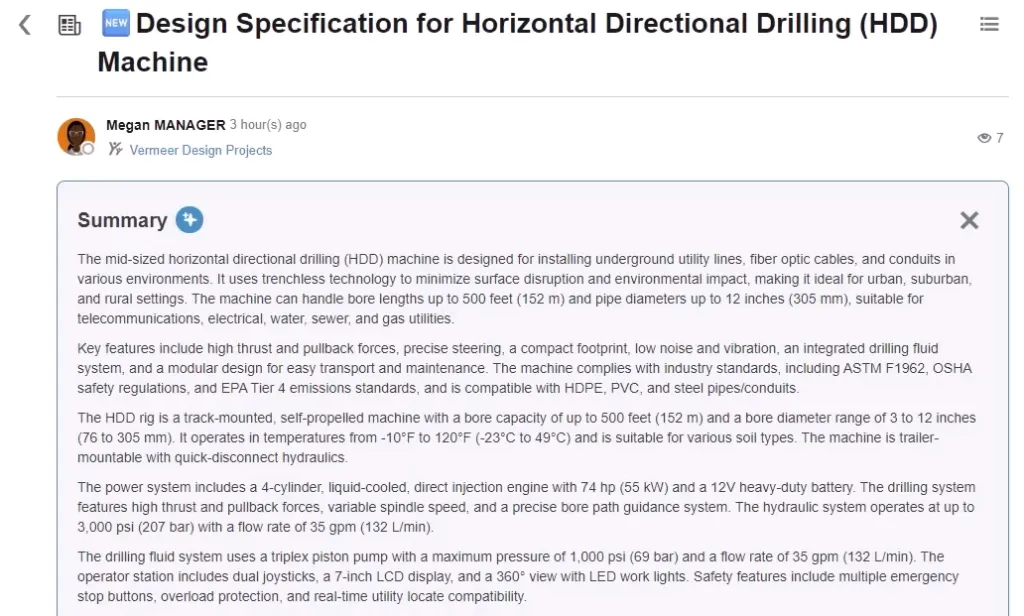
Using AURA to summarize conversations
This feature is particularly useful for teams navigating large volumes of technical content or troubleshooting design challenges collaboratively.
Using Configurations as Physical Products
SOLIDWORKS now allows users to save configurations to 3DEXPERIENCE as distinct physical products. This provides greater flexibility in structuring designs and managing references, especially useful for manufacturers dealing with product variants or custom assemblies.
Embedded SOLIDWORKS User Forum
The SOLIDWORKS User Forums act as a long-standing, valuable resource to every SOLIDWORKS user. In 2026, the User Forum is now directly accessible from the SOLIDWORKS Task Pane.

SOLIDWORKS User Forum embedded in the Task Pane
This integration makes it easier for engineers to tap into community knowledge without leaving their workspace.
Easy File Sharing
Designs can now be shared directly from the File menu in standard formats like PDF, STEP, STL, and IGES. SOLIDWORKS users can also control access permissions, ensuring secure collaboration with external stakeholders.

Sharing files directly from SOLIDWORKS
Automatic Drawing Stamping
Change management is simplified with automatic drawing stamping. As tasks are completed, drawings are updated with usernames, approval dates, and maturity status, ensuring accuracy and traceability.
Weldment Cut Lists on 3DEXPERIENCE
SOLIDWORKS designers can now publish weldment cut lists directly to the 3DEXPERIENCE platform. These cutlists include any structural members, sheet metal components, and other critical components.

Saving a cut list to 3DEXPERIENCE
This supports more accurate engineering bills of materials and streamlined manufacturing workflows when collaborating on 3DEXPERIENCE.
External Design Tables
When saving components to the cloud, SOLIDWORKS now recognizes external design table relationships. No longer are design tables left out of the upload.
This ensures full visibility and management of configuration references, improving design integrity.
Marking Deformable Components
Purchased components like gaskets or o-rings can now be marked as deformable.
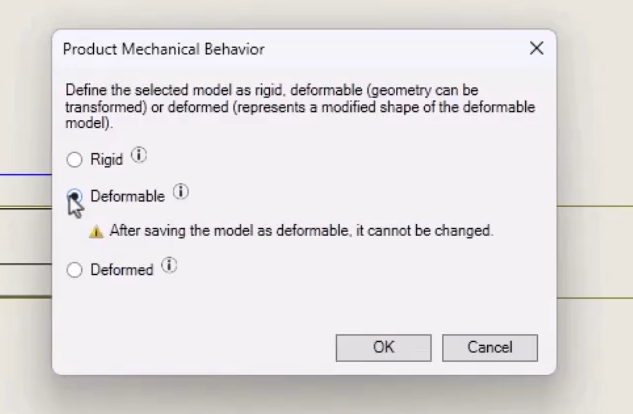
Creating a deformable component in SOLIDWORKS
SOLIDWORKS designers can associate installed states with purchased components using part numbers, ensuring full traceability throughout the design lifecycle.
Automatically Update File Locations in Bookmarks
File locations that reference bookmarks now update automatically when changes occur. This ensures everyone always has access to the latest content, reducing errors and improving version control.
Improved Collaboration in 3DSwym Communities
3DSwym communities now support collaboration on projects, issues, and bookmarks. This centralized access to project data enhances team coordination and decision-making.
Automatic Office Document Approval Routes
Document approval workflows are now automated.

Automatic Office document routing
Engineers can initiate routes that notify the right reviewers, and once approved, documents transition to release automatically.
Comments and History on Iterations
3DEXPERIENCE iterations can now include comments describing changes to better document changes.

Adding comments to a design iteration
Engineers can revisit previous states with clarity, improving collaboration and design review processes.
Smart Components Saved to 3DEXPERIENCE
Smart components can now be stored on the 3DEXPERIENCE platform. This ensures consistent feature creation and accessibility across teams, saving time and reducing errors.
Upgrading to SOLIDWORKS 2026
SOLIDWORKS 2026 delivers meaningful improvements that simplify collaboration while enhancing control and integration. From basic data management to intuitive change and approval management, these updates reflect the evolving needs of professional engineers.
Whether you need assistance during the upgrade process or just want to explore these great new enhancements, TriMech is your trusted technical partner. Our team is here to help ensure that upgrading to SOLIDWORKS 2026 is one of the best decisions you make.
To learn more about SOLIDWORKS 2026 and get a trial, click here.