




How Engineering Data Management Helps Product Design and Manufacturing

The design and manufacture of products necessitate the creation of engineering data to support those processes. As a result, having a dedicated engineering data management system is critical to long-term success.
Maintaining parametric CAD files and associated documentation requires data management tools to ensure preservation of project history, collaboration between stakeholders, and informed decision-making. While that requirement is pretty universal, business needs and the systems required to meet those needs can vary drastically. Let’s define some key aspects and benefits of the product data management landscape.
Benefits of Using Engineering Data Management
Data management comes in many forms, but whether you’re using Windows Explorer or a full Product Lifecycle Management (PLM) tool, the core principles of document control are the same. Data is acquired from a wide variety of sources and tools, stored securely in a central repository, and organized in a structure that makes sense for functional business units to collaborate. Depending on the size of the team and products being designed, other key aspects of a data management system are to assist in validation of the accuracy and consistency of data, analysis of the data for project and company performance, and governance of data access, security, and compliance with standards and regulations.
These engineering data management functions can be performed by a wide variety of software applications and even offline procedures, but consolidating data into a system that can perform more of these tasks for you provides a lot of benefits. Having a single system improves collaboration and decision-making by creating a reliable and readily accessible data source free of redundancy. In turn, time is used more effectively since there is less manual data entry and rework. Manufacturing costs can also be reduced since clearer communication to the shop prevents the manufacture of parts to the wrong revision.

Putting engineering data management at the center of design
While much of this depends on the type of system required and the implementation of that system, in almost all cases, the structure a data management system provides will help improve efficiency. You can maximize the quality of your organization’s output with the same or even fewer inputs required. Having established that data management systems are powerful tools, let’s examine two popular acronyms used to define these systems and their key characteristics.
What is PDM?
Product Data Management (PDM) systems like SOLIDWORKS PDM provide a scalable and CAD-aware file repository to organize and manage files. This secure and comprehensive environment is often referred to as the “vault” although its behavior is really more like a library. Beyond providing a consistent and repeatable structure to the data, particularly if you use things like templates in PDM Professional, files are secure in that they can be checked out for editing and checked in to secure that iteration of the file to the vault’s history. This keeps the file in a single location so that the latest version is clear and definitive, but with a traceable history of changes.
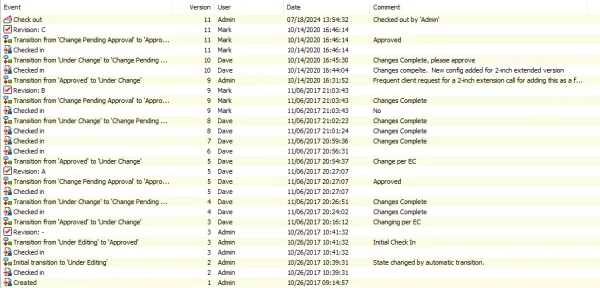
SOLIDWORKS PDM history showing versions and revisions of a file
Besides data security and clarity, another key benefit of PDM systems is that you can include and manage additional properties of a document by tagging it with metadata. SOLIDWORKS PDM makes these fields searchable in a way that is more robust and quicker than just searching indexed files in Windows Explorer. SOLIDWORKS PDM Professional, templates, and leveraging an open API mean data entry to these fields can be autonomous and pulled from other external systems required to run businesses, like an ERP, CRM, or MRP system.
Controlled user access and process control tools like configurable workflows further contribute to data security and traceability in a robust PDM system. Workflows help to categorize data by the stage they exist in the development process, and user access controls help to delegate permissions for who can see and move data through these processes. With SOLIDWORKS PDM, many of these critical functions can be performed directly within the applications used to create the data, so instead of the client interface within Explorer, users can leverage product data management directly within SOLIDWORKS, Microsoft Office, and even other 2D and 3D CAD tools.
What is PLM?
Product Lifecycle Management (PLM) is broader in its scope than PDM while still achieving the same goal of managing data, so much so that many PLM systems can integrate PDM systems. While they are more similar than they are dissimilar, the key points that define a PLM system over a PDM system are that they are generally record-based and process-focused.
The records within a PLM system act as virtual documents to represent something that isn’t necessarily a file but is still a necessary piece required to manage and track a product or project. A common example of this would be something like the bubble wrap used to ship a product. Is that modeled in CAD for most companies? Almost certainly not. Is it still an additional purchased component that should be accounted for in a shipping BOM? Almost certainly. PLM systems allow you to define records of components that are tagged with the metadata that your organization would need to track usage, inventory, and scope if you’d ever want to make a change.
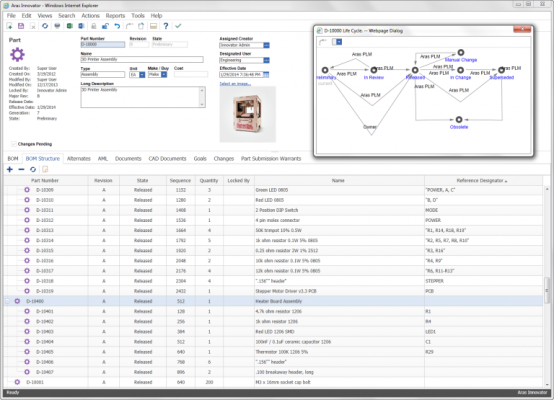
Aras Part Lifecycle
By understanding the concept of records, you can likely already begin to see where PLM systems, like Aras, or PLM-like systems like SOLIDWORKS Manage, tend to involve more functional business units than PDM might. Limited by being a data management system, PDM systems can only begin governance operations on a project when files are put into the vault. In a PLM system, you can kick off that project as a record in order to track the body of documents generated from cradle to grave.
What Product Data Management Solution is the Best?
The best engineering data management solution is the one that works best for your team. Whatever system you use should help you deliver results on time, correctly, and comply with any standards or certifications you are subject to. For some companies, that may require a PLM system fully integrated across their entire business, but for others, it may be as simple as just being able to check files in and out of a central repository.
SOLIDWORKS PDM or the 3DEXPERIENCE platform are often great starting points for exploring CAD-aware data management solutions, as they are configurable and scalable to meet many engineering departments’ needs. While there isn’t a definitive “best” solution, the best starting point is a conversation with experts on these systems, like the team at TriMech.
Related Service
SOLIDWORKS Services
- System Implementation, Customization and Deployment
- Business Consultancy
- Training and Support

Related Content

Getting to Market Faster: From Design to Production Event
Join the Getting to Market Faster: From Design to Production event to learn how to reduce rework with SOLIDWORKS, simulation, and additive workflows.
SOLIDWORKS Inspection ROI Calculator
Use our SOLIDWORKS Inspection ROI calculator to quantify time savings, improved accuracy, and faster inspection reporting with automated workflows.

Top 5 Reasons to Upgrade from SOLIDWORKS PDM to SOLIDWORKS Manage
Are you getting the most out of your SOLIDWORKS PDM investment? In this webinar, we explore how SOLIDWORKS Manage builds on the familiar foundation of SOLIDWORKS PDM Professional to deliver advanced data, process, and project management capabilities in a single, connected environment. You’ll learn how SOLIDWORKS Manage enhances your existing PDM system with record-based item…