By
By Getting started with any new software is always tricky, trying to learn the interface and workflows to help you get your job done. While it is not a replacement for formal training, the free SOLIDWORKS tutorials are an incredible resource for getting a basic understanding our your favorite SOLIDWORKS tools.
Whether you are a brand-new SOLIDWORKS user just learning the basics or a certified professional looking to brush up on more advanced techniques, you’ll find value in reviewing the built-in SOLIDWORKS tutorials.
Where Are The SOLIDWORKS Tutorials?
Inside SOLIDWORKS, you can find the free tutorials by clicking the question mark symbol in the top right and then selecting tutorials. These tutorials do not require an internet connection or an account, and all they require is for SOLIDWORKS to be installed on your computer.
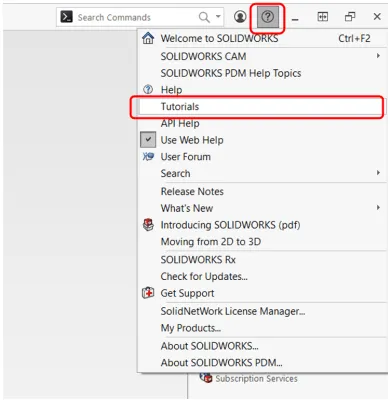
Opening the free SOLIDWORKS tutorials
This opens a separate window with different sections and topics to explore, including Getting Started, Basic Techniques, Advanced Techniques, Design Evaluation, and more. You can read the tutorial instructions on the right as you work in SOLIDWORKS on the left, or drag the windows to separate monitors. As you explore different sections, you will see a brief description of the topic as well as an estimated time to complete the walkthrough.

Selecting a tutorial from the side window
How to Use the Tutorials
Some tutorials will have a step-by-step walkthrough of creating a file from the start, like the example shown below. After completing the steps on the screen, be sure to click “Next Topic” in the lower right corner to move onto the next set of steps.

Advancing to the next SOLIDWORKS tutorial step
Other topics, however, will start from an existing file that you can open directly from the tutorial or by navigating to the installed path. These existing files are loaded onto your computer during SOLIDWORKS installation and are usually found in the location listed below:
C:\Users\Public\Documents\SOLIDWORKS\SOLIDWORKS [version]\samples\tutorial.
Accessing Additional SOLIDWORKS Sample Files
Sample model files are loaded onto your computer during SOLIDWORKS Installation. You can browse through these files at any time, and there is a shortcut within SOLIDWORKS for accessing them.
In SOLIDWORKS, click the Home icon on the top bar of the screen to launch the “Welcome – SOLIDWORKS” window. In this window, click the Learn tab. Select “On my PC” and a Windows File Explorer window will open directly to the folder that contains sample and tutorial models.

Accessing the SOLIDWORKS sample files
The sample files, like the one shown below, include comments on every feature, describing the steps taken to build the model from start to finish. Reviewing these premade files is a great way to get familiar with modeling techniques in SOLIDWORKS.

Comments embedded in the sample files
More Free SOLIDWORKS Tutorials
For other products like SOLIDWORKS Simulation and SOLIDWORKS CAM, tutorials can also be found in the question mark menu by clicking on the specific tool’s menu, as shown below. These additional tutorials will only appear if you have the relevant add-in activated and will not show up otherwise. However, you can find the PDF version of these documents in the installation directory.

Using specific tutorials for add-ins
What If I Don’t Have SOLIDWORKS Installed?
For users who do not have access to a license or installation of SOLIDWORKS, free online tutorial videos can be accessed through MySolidWorks. On MySolidworks, you have access to a range of free tutorials with a guest account or additional tutorials if you tie your account to your company’s SOLIDWORKS Subscription. One of the most popular online lessons is the Introduction to SOLIDWORKS, which gives a walkthrough of bottom-up assembly modeling and detailed drawing techniques.
Going Beyond Basic SOLIDWORKS Tutorials
The built-in, free SOLIDWORKS tutorials are a great start to your SOLIDWORKS learning journey, but they can only take you so far. The tutorials give a good introduction to the topics without having to invest much time, but do not give someone a fundamental understanding or a chance to dive deeper into the topics.
What they truly lack is the direct, instant feedback to questions that you would gain from a formal, instructor-led training class. The upside is that no matter the topic or SOLIDWORKS product you want to sharpen your skills with, TriMech is here to support with our best-in-class training.

Related Service
Ready to learn more?
Whether you need expert guidance, product support, or simply explore your options, our team is here to help.