




Everything You Need to Know About Electrical Schematic Diagrams

Electrical schematic diagrams serve as the backbone of almost every electrical assembly in the world. Knowing how to read and identify the different types of electrical drawings allows you to easily understand your electrical system, providing a clear pathway to successful assembly and servicing. However, electrical schematic diagrams do come with common mistakes that you can easily avoid by using the best electrical schematic tools available!
What is an Electrical Schematic Drawing?
Electrical schematic drawings are a set of documents that provide essential information to aid in the manufacturing or servicing of electrical systems. The diagrams help to illustrate component connections, bills of materials, and other detailed information by using standardized symbols and electrical standards. These diagrams are crucial for accurately designing, building, and troubleshooting electrical circuits.
Types of Electrical Schematic Diagrams
The electrical diagrams provide a detailed representation of the electrical components in a variety of ways, ranging from very broad-scope system interconnect drawings all the way to extremely detailed multi-line schematics.
Single-line Diagrams
Single-line diagrams use a combination of single lines to connect the electrical symbols within a schematic. These are often used to provide a simpler view of the electrical system by combining the individual wires into a single line to help reduce clutter. These might often be created early on in the development process to help visualize the component placement and connections before diving into the nitty-gritty.

Single-line electrical diagram
Single-line diagrams still provide key information about the electrical components and their connections, but are not as detailed as a multi-line diagram.
Multi-Line Diagrams
Multi-line diagrams are a deeper, more detailed version of a single-line diagram. These diagrams utilize separate lines to represent each conductor that connects two components. Additionally, the multi-line diagram will show detailed information about the wires and connections, similar to how creating a manufacturing drawing of a 3D part gives detailed product manufacturing information.

Multi-line electrical diagrams
Multi-line diagrams provide a deeper level of understanding of the system that is extremely helpful when servicing the system or during the initial installation.
System Interconnect Diagrams
System interconnect diagrams, also referred to as block diagrams, show an extremely high-level overview of the electrical system. While single-line diagrams will still utilize standard symbols to represent components and may often show a fanout for electrical connections, the system interconnect diagrams utilize simple blocks for components. These care less about the connections or placement of components and more about the system-level interaction. Oftentimes, you might see images of components instead of blocks to give a better understanding of the actual component being used.

System interconnect drawing
System interconnect diagrams are typically the earliest schematic diagram created as the electrical system is being built out, but can also be done later on to provide a higher-level overview for stakeholders.
How to Read an Electrical Schematic
Reading an electrical schematic begins with understanding which electrical standard is used to represent the electrical components. Common standards are the International Electrotechnical Commission (IEC) and the National Electrical Manufacturers Association (NEMA), with each having its own guidelines for schematic symbols and diagrams.

A sample electrical schematic
After reviewing the standard, you can begin to follow wires from a power source through each component to see how the circuit would operate under load. Pay close attention to the different labels and annotations on components and wires. These could be reference designators (R for resistors, T for terminals, etc.) or other attributes, including safety information, voltage required, or part numbers. By combining the electrical standard, component labels, and wire tracing, you can effectively understand the electrical system.
Best Tools to Create Electrical Schematics
While there are countless programs and tools to create electric schematics, TriMech has curated and supports only the best of the best.
SOLIDWORKS Electrical
SOLIDWORKS Electrical is your dedicated ecosystem for electrical schematic design. Within the ecosystem, there are two different products: SOLIDWORKS Electrical Schematic and SOLIDWORKS Electrical. SOLIDWORKS Electrical Schematic provides the fundamental tools for designing, reviewing, and iterating electrical schematic diagrams for single-line, multi-line, and system interconnect diagrams. SOLIDWORKS Electrical 3D bolts on top of your SOLIDWORKS CAD to take the designed schematics and represent them in SOLIDWORKS assemblies. What this means you get a true one-to-one, electro-mechanical assembly that provides better documentation for assembly and servicing.
What makes this toolset so powerful is that it is connected to the rest of the SOLIDWORKS ecosystem. Outside of the Electrical 3D integration, clients have had success leveraging SOLIDWORKS PDM for managing their electrical projects and SOLIDWORKS Composer to create detailed assembly instructions.
Electrical Schematic Designer
Electrical Schematic Designer (ESX) is very similar to SOLIDWORKS Electrical in that it provides a dedicated environment to produce single and multi-line electrical diagrams alongside the system interconnect drawings. Additionally, there is also a role available to enable the SOLIDWORKS 3D integration for generating complete electro-mechanical assemblies.
However, the biggest differentiator between SOLIDWORKS Electrical and Electrical Schematic Designer is that ESX is a 3DEXPERIENCE native tool. This means that instead of leveraging data management tools like SOLIDWORKS PDM, you get to use the cloud-based data management included with SOLIDWORKS Cloud Services. Being able to access your electrical diagrams and schematics from wherever you are could be a big benefit to companies with mobile service departments or remote workers.
Common Mistakes with Electrical Diagrams
Fat-Finger Errors
A common challenge faced by any design team, electrical or otherwise, is the high chance of a fat-finger mistake. This could come in the form of adding an additional count to the quantity of a bill of materials or mistyping a component attribute from a spec sheet. Some of these errors could be quickly noticed, but if gone unnoticed, could spell disaster down the line.
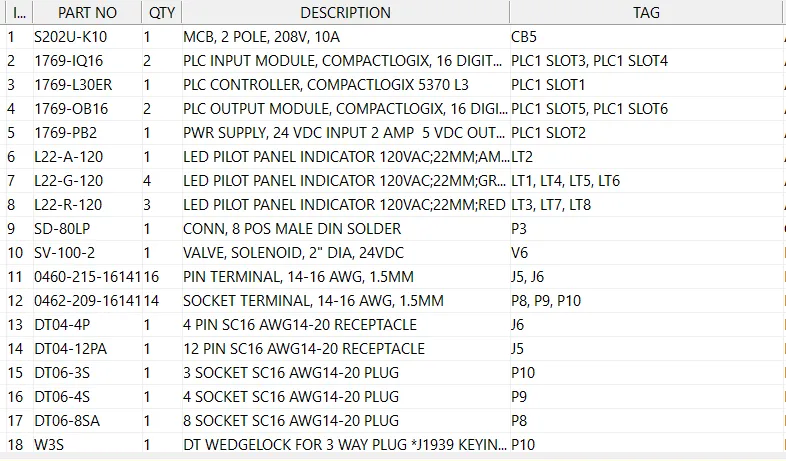
Automatically generated bill of materials
Using a tool that has your back and allows you to leverage automation is crucial for your team’s success. Don’t rely on human perfection when you can trust purpose-built tools made for automation.
2-Dimensional Ambiguity
The biggest challenge that’s faced with electrical schematics is that they lack the 3rd dimension when assembling or servicing these systems. As much detail as a multi-line diagram provides and as much overview information that a system interconnect drawing can show still lacks the depth component to show where wires and cables will route around a cabinet. By only thinking in 2D space, there is a lot left up to the experience and discretion of who is reading the schematic at that time.

Using SOLIDWORKS Composer for panel assembly instructions
By adding a 3rd dimension and representing the same electrical diagram in the 3D space, you can remove a lot of the ambiguity from your designs. Ensuring that components are placed exactly where they’re needed and specifying different routes for high and low voltage cabling can be the difference between getting products out on time and rerunning wires that were cut too short.
Manual Error Checking
Everyone has a lot on their plate to juggle, and adding the responsibility of manually checking that all the wires are labeled and a part number isn’t mixed up in an electrical schematic diagram often leads to things being missed. What might seem like a simple error to fix on a drawing could end up as a greatly increased lead time waiting for a new component to arrive that should have been ordered in the first place.

Automatic electrical standard checking
Relying on manual reviews of an electrical schematic greatly increases the chance for human error. Tools like SOLIDWORKS Electrical and Electrical Schematic Designer have built-in Design Rule Checks that take the pressure off your users and make sure you stay on your selected electrical standards.
Looking to Create Electrical Schematics?
TriMech is here to support your company’s investment in tools to create accurate, standardized electrical schematics. Whether you’re doing low-volume, less detailed drawings or high-volume, highly complex electrical diagrams, having the right tool for the job is essential to your success. Making sure your tool integrates with SOLIDWORKS is the easiest way to ensure the electrical and mechanical teams are on the same page and that you’re set up for a future of success.
Request more information about implementing an electrical design solution here.

Related Software
SOLIDWORKS Electrical
SOLIDWORKS® Electrical software helps simplify electrical schematic creation with an intuitive interface for faster design of embedded electrical systems, including power systems, user controls, complex wiring, and harnesses.

