Drawings | What’s New in SOLIDWORKS 2026
SOLIDWORKS 2026 introduces a suite of enhancements that elevate drawing creation to new levels of precision, flexibility, and efficiency. This year’s improvements push the boundaries of automation, precision, and user control in technical documentation. Whether you’re working with native SOLIDWORKS models or imported geometry, the latest features are designed to support your commercial goals and elevate your design-to-production pipeline.
Come explore the standout features in drawing creation that make SOLIDWORKS 2026 a must-have for companies looking for a competitive edge.
AI Drawing Creation
SOLIDWORKS 2026 introduces automatic drawing generation powered by artificial intelligence. This is a ground-breaking enhancement that provides incredible time savings when creating technical documentation.
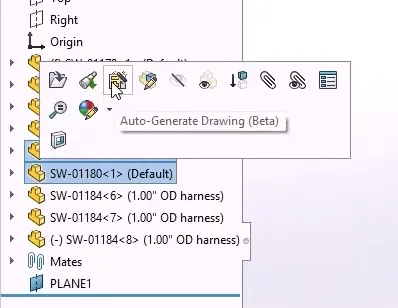
AI-powered drawing generation
Engineers can now select one or more parts or assemblies and initiate drawing creation via a simple pop-up menu. The process runs in the background, allowing users to continue working uninterrupted. This batch-driven approach significantly reduces the time spent on repetitive tasks, freeing up engineers to focus on high-value detailing and design refinement.
Predictive View and Annotation Placement
Manually scaling, placing, and organizing drawing views is now a thing of the past. SOLIDWORKS 2026 predicts the optimal template and sheet size needed based on the model or allows users to apply their own.
Drawing views are automatically scaled and arranged to minimize overlap. AI-based geometry recognition identifies section views and applies annotations such as hole callouts, geometric tolerances, and reference dimensions, making your drawings smarter and more production-ready without manual interaction.
Drawing Automation for Assemblies
For complex assemblies, SOLIDWORKS 2026 automates the insertion of bills of materials, auto balloons, and revision tables. This enhancement dramatically reduces the time required to prepare comprehensive documentation.
SOLIDWORKS users can now produce volumes of assembly drawings with minimal manual input, ensuring consistency and accuracy across projects.
Magnetic Line Alignment Improvements
Introduced in 2012, magnetic lines helped streamline the organization and alignment of drawing balloons. With SOLIDWORKS 2026, magnetic lines now support a wider range of drawing entities.
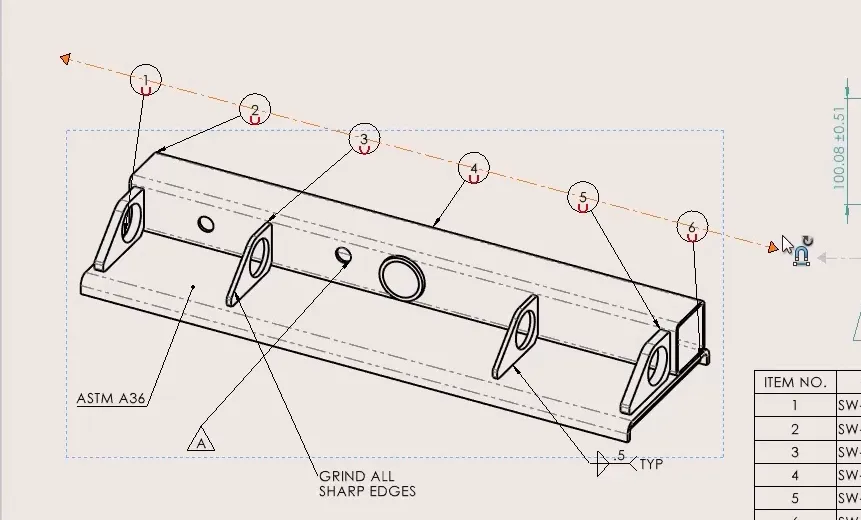
SOLIDWORKS drawings magnetic lines
Draw a magnetic line over existing annotations, including notes, weld symbols, and surface finish marks, to snap them into alignment. This enhancement helps to maintain a clean and professional layout with minimal effort.
Customizable Geometric Control Frames
Geometric tolerance control frames now support custom text entries in range fields, allowing for symbols or letter values in place of numeric ones.
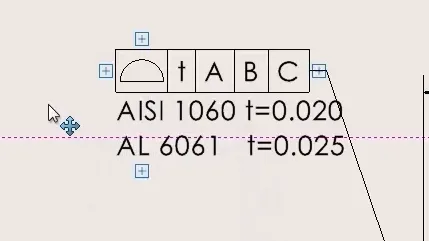
Custom text in a control frame
This is particularly useful when referencing variables from tables, notes, or tolerance books. SOLIDWORKS users can now specify tolerances with greater flexibility, supporting more sophisticated documentation standards.
Introducing ISO 21921 Symbols
A new SOLIDWORKS Document Property enables surface finish symbols that conform to the ISO 21921 profile standard.

Activating ISO 21921 standards
This update introduces a modernized symbol style and allows for the specification of tolerance indicators and optional datum references. Engineers working in regulated industries or with international partners will appreciate the improved compliance and clarity.
Annotation Visibility Control for SOLIDWORKS MBD
SOLIDWORKS MBD users can now hide or show multiple annotations with the same ease as in 2D drawings.
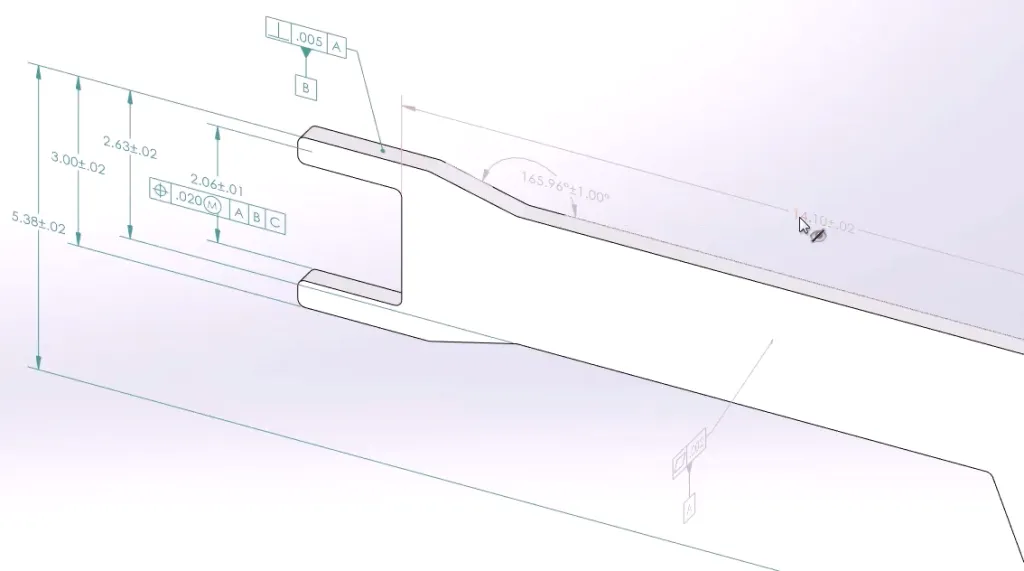
Controlling visibility of SOLIDWORKS MBD dimensions
Selected annotations turn grey to indicate they will be hidden and can be toggled back with a click. This selective control improves how design and manufacturing information is communicated, especially when working with vendors who prefer 3D documentation.
DimXpert Filter Bar
The SOLIDWORKS DimXpert Manager tab now includes a filter bar, similar to the Feature Manager.
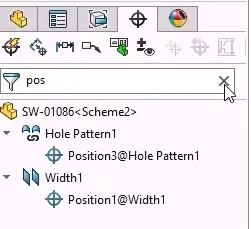
Filtering DimXpert dimensions
Engineers can quickly isolate dimensions, tolerances, or features by typing into the filter field. This enhancement simplifies the management of complex models and reduces the risk of errors by making it easier to locate and edit specific elements.
Upgrading to SOLIDWORKS 2026
SOLIDWORKS 2026 delivers meaningful improvements that simplify drawing creation while enhancing control and integration. From smarter drawing creation to intuitive control over annotations and dimensions, these updates reflect the evolving needs of professional engineers.
Whether you need assistance during the upgrade process or just want to explore these great new enhancements, TriMech is your trusted technical partner. Our team is here to help ensure that upgrading to SOLIDWORKS 2026 is one of the best decisions you make.
To learn more about SOLIDWORKS 2026 and get a trial, click here.