




 By
By BOMs(Bills of Materials) are used to list the materials or components that make up a product and that list can be represented in many forms, two of which are the engineering BOMs (EBOMs) and manufacturing BOMs(MBOMs).
In this article, you will learn:
- The basic function of EBOMs and MBOMs
- How bill of materials is created
- How to unify EBOMs and MBOMs with proper tools like SOLIDWORKS PDM and SOLIDWORKS Manage
The Engineering Bills of Materials (EBOMs)
EBOMs are generally put together during the design phase, as the (2D/3D) parts and sub-assemblies models are created and combined to define the look and composition of the product. This bill of material provides a comprehensive list of the items required to build a product or assembly.
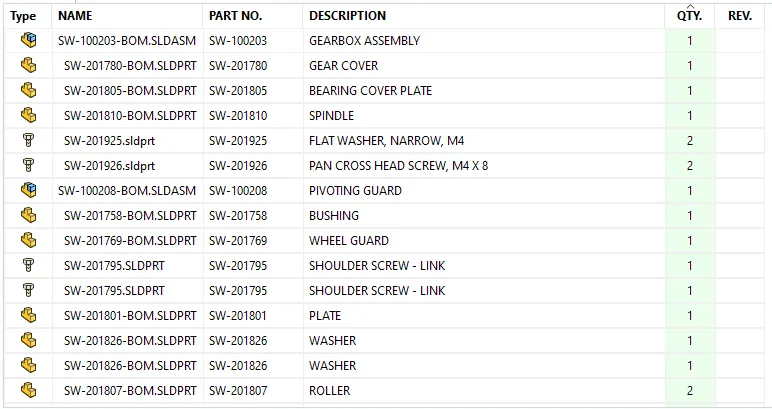
EBOM sample
The Engineering BOMs typically starts with a 2D, or 3D design of the product and outputs the BOM as a (Excel or text) parts list, or on a tabulated table on a drawing.

Typical EBOM Creation Process
The Manufacturing Bills of Materials (MBOMs)
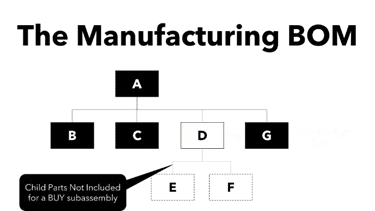
MBOMs provides the items needed to build a component or assembly, and in a manufacturing environment, the BOMs generally appear in two places: on drawings and/or in the ERP/MRP systems.

Manufacturing BOM Sample
The Manufacturing BOM typically starts with the engineering BOM and then adds other non-design items to aid in the manufacturing or shipping of the final product.
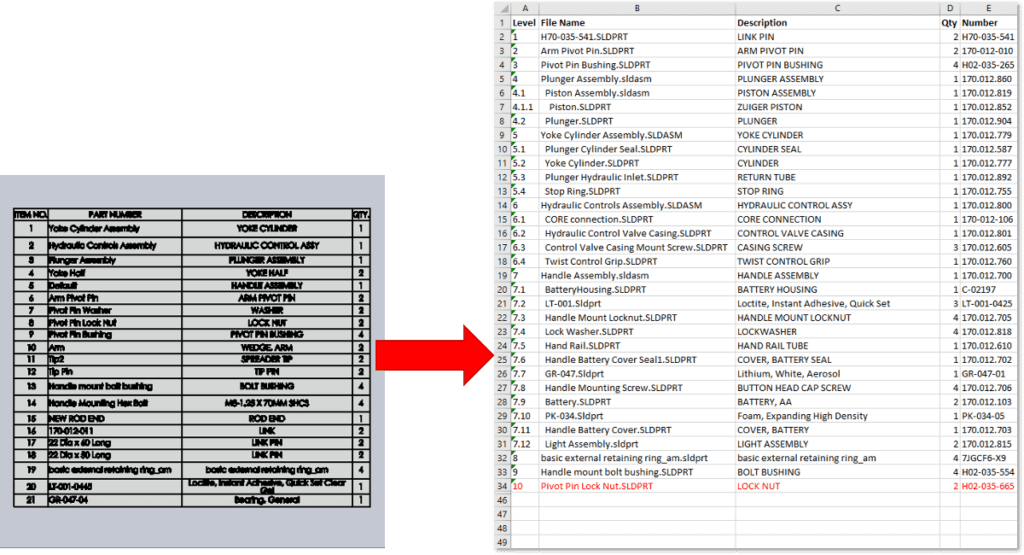
Typical MBOM Creation Process

Do I need both MBOM and EBOM?
Manufacturing BOMs (MBOMs) appear similar to the engineering BOMs (EBOMs) with several key differences. The structure of the MBOM supports the fabrication and assembly of the product, while the EBOM defines the form, fit, and function of the product design.
So, knowing this one might ask, do we need both? The answer is it depends. It depends on who needs it and what they need if for.
- If the person asking needs to understand the design and functioning of the product without having the physical parts, then they would use the EBOM.
- If on the other hand they want to know the operational steps, fixtures, tools, or equipment required in addition to the items listed in the EBOM to produce the product, then they would use the MBOM.
How to Unify EBOM and MBOM?
Unifying the EBOM and MBOM means starting with an EBOM and adding the required manufacturing MBOM items to the EBOM without starting the MBOM from scratch. There are several ways in which the EBOM and MBOM can be unified, here are three common ways this can be done.
- Manual Data Entry
- Excel Spreadsheet
- Digital Data Transfer
Manual Data Entry
This is done by manually typing each item from the EBOM along with the additional items for the MBOM into a new destination source. This might be a simple Excel sheet, or an order management system such as ERP. This method is very time consuming and error prone, and while still being used today, is considered poor practice.
Excel Spreadsheet
This method typically starts by exporting or saving the EBOM to an Excel spreadsheet, then additional rows with the MBOM items are added. While this reduces the errors of retyping the EBOM items, it is still time consuming and subject to errors. Also, when the items in the EBOM changes, this process must start over again.
Digital Data Transfer
A better way to unify the BOMs is to digitally connect them using data management tools designed to open the MBOM and electronically import the EBOM without manual data entry. The non-design items can then be added to complete the MBOM, and if the EBOM changes, it can be automatically reflected in the MBOM.
One such toolset that enables this capability is SOLIDWORKS PDM® and SOLIDWORKS Manage®.
- SOLIDWORKS PDM manages and generates the EBOM directly from the SOLIDWORKS design files.
- SOLIDWORKS Manage is then able to view and import the EBOM into a linked MBOM structure.
Using the combination of both tools, the EBOM and MBOM will coexist and can evolve together independently or as one connected master BOM.
As an added benefit, the SOLIDWORKS Manage MBOM can electronically transfer the MBOM to an ERP system, which is typically the next step in the supply chain operations.


