




Best Practices for Working Remotely with SOLIDWORKS PDM
Working remotely with SOLIDWORKS PDM doesn’t have to be challenging. As engineering teams continue shifting toward hybrid and fully remote work models, ensuring smooth collaboration with SOLIDWORKS and Product Data Management (PDM) systems has become essential.
SOLIDWORKS PDM is built to protect your CAD data, maintain version control, and unify your design team’s workflows regardless of where each person is located.
Remote environments introduce new challenges (connection speeds, data transfers, and access reliability) that become more important than ever to overcome. Being aware of common challenges for working remotely with SOLIDWORKS PDM means you can overcome them and ensure the best performance for your distributed workforce.
How SOLIDWORKS PDM Works
SOLIDWORKS PDM is a Windows Server–based system that uses Microsoft SQL to manage everything from file storage and version history to approvals and revision control. Unlike cloud-native tools, SOLIDWORKS PDM integrates seamlessly with Windows File Explorer, enabling engineers to browse and work with vault data directly through a familiar interface.
With SOLIDWORKS PDM, you can:
- Track versions and revisions
- Control access to files based on permissions
- Automate approval workflows
- Maintain complex file references
- Utilize project and file templates
- Integrate with SOLIDWORKS and other CAD tools
How SOLIDWORKS PDM Supports Working Remotely
SOLIDWORKS PDM is server-dependent, but the server can be physically on-premise or in the cloud. TriMech supports both configurations and has decades of experience with teams working remotely with SOLIDWORKS PDM.
Checking Files In and Out
One of the biggest strengths of SOLIDWORKS PDM in remote environments is how it handles file access. To start working on a file, a user must check the file out, which effectively takes ownership of that file. When they are done, they must check the file back in to update the rest of the team on progress and release ownership.
When a user checks out a file:
- A local copy is transferred from the vault to the user’s machine.
- The user edits the file locally instead of communicating over the network.
- All incremental saves occur in the user’s local cache.
When a user checks in a file:
- The changes are uploaded back to the vault.
- The file becomes available to others.
- A new version of the file is created and securely stored.
Why This Matters for Remote Work
Without SOLIDWORKS PDM, remote users often access CAD files over a VPN-connected Windows file share. This is risky because a dropped connection can corrupt files, and they generally experience less than optimal performance.
With SOLIDWORKS PDM, the transfer only happens when actively checking in or out files. All the file changes occur locally, and only the delta is transferred to the vault, maximizing performance and minimizing corruption risk.
SOLIDWORKS PDM Web2
The SOLIDWORKS PDM Web2 client provides lightweight, browser-based access to your vault. With it, users can browse vault contents, preview files, review data cards, and interact with the approval workflows.
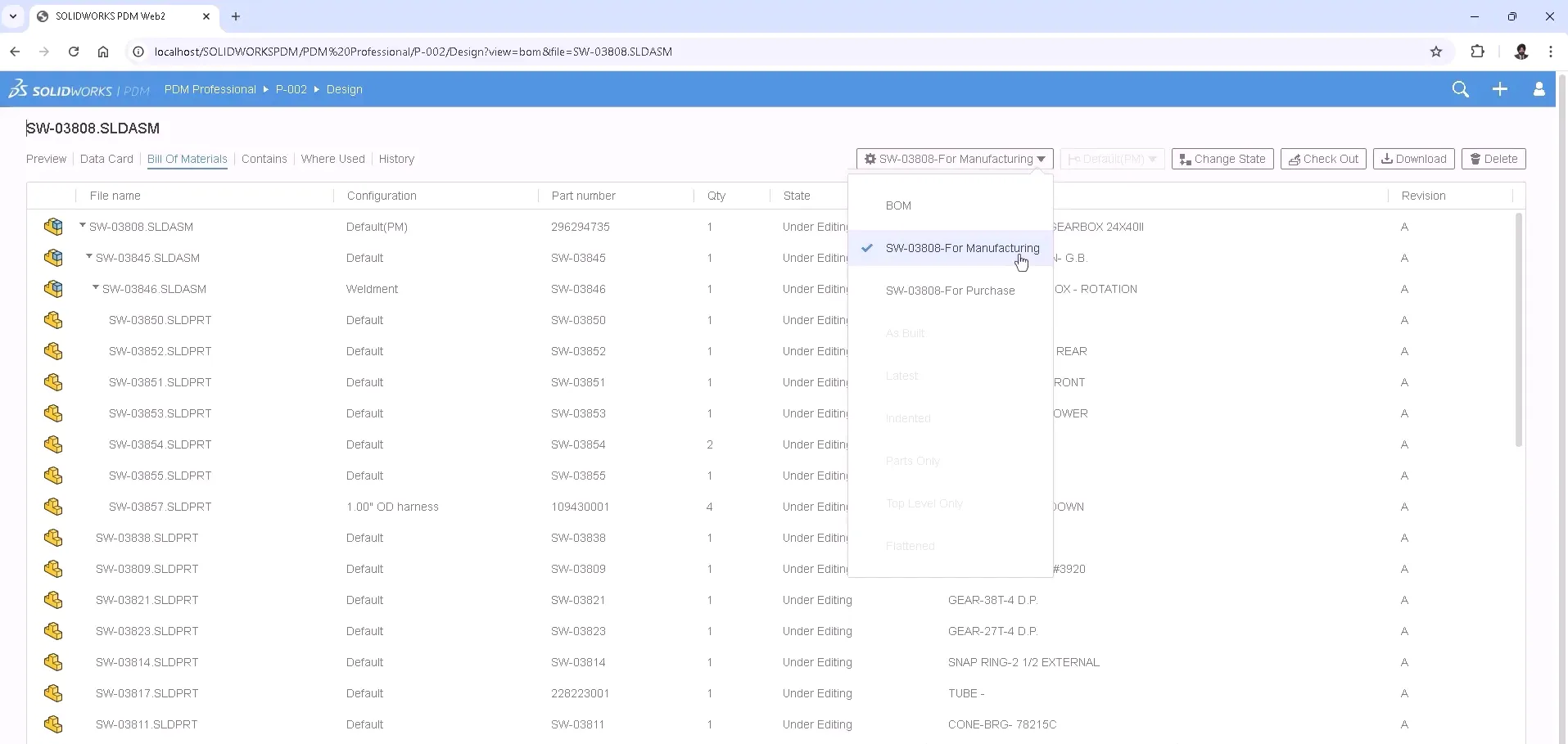
However, the Web2 client does not integrate directly with SOLIDWORKS or other CAD software, so it is less useful for day-to-day engineers. Its strength comes from providing robust access to reviewers, managers, or other stakeholders who need to approve documentation from any device.
Why This Matters for Remote Work
Without SOLIDWORKS PDM Web2, approvers need to be working on Windows-based systems with SOLIDWORKS PDM installed. This restricts collaboration to those within your organization and can lead to dropped approvals or inaccurate tracking signatures.
With the Web2 client, internal and external stakeholders can have their voices heard wherever they are. If an engineer is on a jobsite or traveling to a client, they can participate in reviews without having to wait until they return to the office.
Multi-site Vault Replication
Remote work doesn’t necessarily mean working from home and can instead encompass a workforce distributed in satellite offices around the globe. With server-based data management, the better the connection back to the server, the better the performance will be.
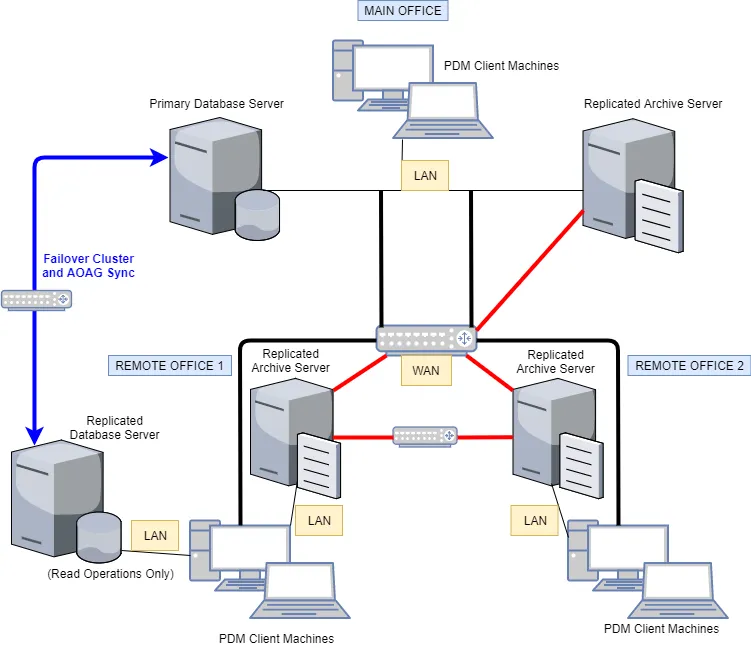
Sample vault replication architecture
SOLIDWORKS PDM replication works by creating a secondary server in an additional location near the remote workforce. Once set up, the files in the vault are automatically synced on a defined interval (hourly, daily, or on demand) so that users are pulling from the closest location to them.
Why This Matters for Remote Work
SOLIDWORKS PDM Professional enables you to replicate both the archive and database servers to increase performance for offices located a large distance from the main hub. For remote workers living closer to a secondary office, it’s often faster to VPN into the nearest location with a replicated vault rather than the main vault location.
Keeping Your Team Ready for Remote Work
Working remotely with SOLIDWORKS PDM doesn’t have to be challenging. By leveraging check‑in/check‑out workflows, using VPN connections strategically, taking advantage of the Web2 client, and considering vault replication, engineering teams can maintain seamless collaboration across any distance.
Making sure your team is prepared for remote work, whether at a satellite office or home office, is paramount to your company’s success and growth. The best way to prepare is to partner with a trusted technology advisor.
Related Products
SOLIDWORKS Software
Discover the range of SOLIDWORKS software products for CAD, CAM, Simulation, Communication, Product Data Management and Visualization.

By Sarah Taylor
Sarah Taylor is a Solutions Consultant at TriMech with 6+ years of experience using various CAD software including SOLIDWORKS, Creo and AutoCAD. She has previous experience in the biopharmaceutical industry as well as HVAC project management. She is a graduate of the University of Maryland where she received her B.S. in Bioengineering.
Related Content
How to Know When Engineering Change Outgrows SOLIDWORKS PDM
Teams are usually concerned about leaving SOLIDWORKS PDM behind if they find that their engineering change processes outgrow it. Fortunately, SOLIDWORKS Manage extends their vault rather than replacing it outright.
Comparing Common Cloud-Based SOLIDWORKS File Management Systems | Why You Need CAD-Aware Data Management
SOLIDWORKS file management systems typically fall into CAD-aware and non-CAD-aware categories, and choosing the wrong option could lead to issues with your company's intellectual property. The most critical piece of data you produce is the SOLIDWORKS projects that drive your business forward, so it is important to keep that protected.

Best Practices for Working Remotely with SOLIDWORKS
Working remotely with SOLIDWORKS requires more than simply connecting from a different location and hoping performance holds up. Hardware, licensing, network architecture, and data management all play a role in determining whether remote work is productive or frustrating.